
CollectIt News & Updates
The latest features, improvements, and updates shipped to your studio — all included in your plan.
Reply From Your Own Inbox, and a Big Week for ChargeIt
The first thing below is worth a look if you'd rather reply to a customer straight from your own inbox than log into CollectIt to do it. The rest is a round-up of what's landed in ChargeIt this week, plus a couple of smaller things that have been live for a little while without ever getting their own announcement.
Reply to a customer without leaving your inbox
A few studios had asked for a proper way to manage the messages coming in from customers. Rather than build another inbox to check, we've put the one you're already living in to work instead.
There's a new switch. Turn it on and every “Send us a message” note on a booking, or reply to one of your collection emails, lands in your own inbox too, not just here. Reply to it like you would any other email and it reaches the customer properly, and it's saved against their record here, so nothing falls through the cracks and nobody else on your team is left wondering what was said. No need to open the dashboard unless you want to.
⚙️ Settings → Collection settings → Customer communication → “Email me when a customer sends a message.” Turn it on, then just reply to what lands in your inbox.
Search, sub-categories, modifiers and a proper export
Four things landed this week, mostly off the back of studios running bigger catalogues than ChargeIt was originally built around.
A search bar on the till, so finding one item in a long list is a few keystrokes rather than scrolling.
Sub-categories — group related items under their own tile, so a section like Pottery can open onto Bowls, Plates and Jugs separately, instead of one long list to scroll through.
Priced modifiers. Build a list of choices — milk types, syrup flavours, sizes — each with its own price if it needs one, and attach the same list to as many products as you like. Set it up once, use it everywhere.
And a sales export that can give you one row per item sold, not just one row per sale, for when you actually need to see what moved.
⚙️ Search and sub-categories are on the till itself. Modifier groups live under ChargeIt → Modifier groups. Export by item is next to your usual sales export.
Also worth knowing about
Undo check-in. Checked someone in by mistake, or too early? There's a small pill next to their badge to undo it — two taps and it's as if it never happened. This shipped a little while ago; we just never got round to telling you.
Your customer portal now has one proper home. The on/off switch, along with What's On, lives together under Settings → GrowIt → Customer portal — one master switch, plus your own choice of what shows inside it: firing progress, book again, and the inspiration gallery.
✅ Everything above is already live — nothing to install, nothing to switch on except where it says so. As always, just hit reply on any shop update if something doesn't work the way you expect.
CollectIt Is on the App Store
After a long wait at Apple's end, CollectIt is on the App Store. You can put it on the iPad at your counter properly now, instead of leaving a browser tab open and hoping nobody closes it.
There's also a new setting for sessions where nothing comes back to be collected, which a few studios have been asking for.
The counter app, on your iPad
It's the same CollectIt. You sign in the same way and everything is where you left it, so there's nothing to move across and nothing to learn.
What you get is a faster scanner, because it uses the iPad's own camera rather than the browser's, and an app that opens from your home screen with no address bar in the way.
Searching the App Store won't find it yet — Apple takes a while to index a new app. Open CollectIt on the iPad and go to Settings, then Get the app, where the link lives permanently. There's no Android app yet; on an Android tablet use your browser's Add to home screen option for the same one-tap access.
If you've previously added CollectIt to your home screen from Safari, this replaces that. It's worth swapping, because the app can do things a home screen shortcut can't.
⚙️ On the iPad, open CollectIt and go to Settings → Get the app. The link is there whenever you need it.
For sessions where nothing comes back
A few of you now run things where the customer takes their work home on the day. Craft evenings, wreath making, that sort of thing. Or a booking that's only ever food and drink.
CollectIt was still setting those up as pieces to fire, photograph and chase, which meant tidying up records for work that was never coming back.
There's now a tick box on each session type called Items need collecting later. It's on by default, and that's right for painting a mug. Turn it off for a session where everything goes home on the day.
You still get a record, so you can add what they had and take payment against it, and it moves itself to Collected once they've paid and been checked out. No ready email, no reminders, no chasing.
⚙️ Settings → BookIt, edit a session type, then look under More options for Items need collecting later.
✅ The app is free and takes a minute to install. If you run your counter on an iPad, it's worth doing today.
Let Customers Pay You to Post Their Pottery
Every studio has them. The pieces that have been fired, photographed, emailed about twice, and are still sat on the shelf six weeks later. The customer meant to come in. They just never did.
One of you asked whether those customers could simply pay to have them posted instead. So that's what we've built, and it's ready now. It's off until you turn it on, and there are two quite different ways to use it.
A postage button on your collection emails
A short section appears at the bottom of your collection emails asking “Struggling to collect your items?” with a button. If a customer presses it, they tell you where to send their pottery and agree to your postage terms. Nothing is charged at that point.
You get an alert on your bell. Click it and you land on their record, where you can see exactly what you'd be posting, photos and all, and the address it's going to. You have a look at what's involved, decide what it's worth, and type in a price.
They get emailed a payment link for that amount. Once they pay, the money lands in your account and you get a second alert saying it's ready to post. Pack it up, press Mark as posted, add a tracking number if you have one, and they get an email telling them it's on its way. The record closes itself.
Until they've paid, they carry on getting your normal collection reminders, so nobody drops off your radar just because they asked about postage and then went quiet. And if something does stall, your bell keeps reminding you: every day for anything that's been paid for but not yet posted, and after a couple of days for a request that hasn't had a price yet.
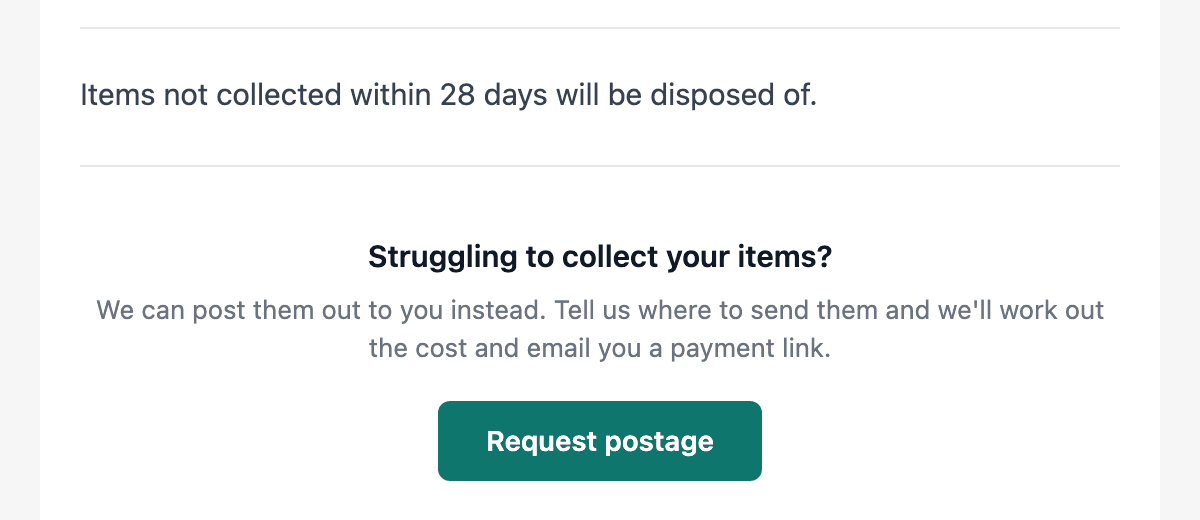
Choose when to offer it, and charge what it's worth
There are two switches and they behave very differently, so this is the bit worth thinking about for a minute.
On your overdue reminders only is the one we'd suggest starting with. The button only reaches people who've already been told their pottery is ready and haven't come in. Everyone else gets your normal email and comes to collect as usual. You're offering postage exactly where it earns its keep, on the shelf that isn't clearing, and your day to day doesn't change at all.
On your ready for collection email offers postage to everyone, the moment their pottery is done. Worth knowing what that means in practice: posting pottery is a faff. It needs wrapping properly, boxing, weighing and a trip to the post office, and that's before anything arrives broken. Put the button in front of every customer and a good few will take it, including plenty who'd happily have walked in on Saturday. If your studio is somewhere people drive to, or you get a lot of visitors from out of town, offering it up front may well be the right call.
Either way, you type the price in yourself once you've seen what's in front of you, so price the job rather than the stamp. The wrapping, the box, your time and the walk to the post office are all real costs, and a customer asking you to post a mug they never came back for expects to pay for the convenience. Add a few pounds over the postage for your trouble.
⚙️ Settings → Email templates, then open Ready for collection or Overdue reminder. The switch is Offer postage from this email. Write your postage terms first, under Settings → Submission Form.
✅ Nothing changes on your emails until you flip a switch. If you've got a shelf that isn't clearing, try it on your overdue reminders for a month and see who takes you up on it.
A What's-On Calendar for Your Website
Until now, everything you had coming up lived in different places. Workshops had their own page, and something like a monthly craft club only showed its dates once a customer had already started a booking. There was nowhere a customer could just look and see what was on.
A studio asked for one place to show off everything they had planned, from their workshops to a weekly knit and natter. It seemed far too useful to keep to one studio, so you can have one too.
Everything you have on, in one view
It shows your workshops, your courses and any session you run on set dates, all together, a month at a time. Customers click a date and go straight to booking that one, rather than landing on a list and hunting for it.
It uses your own brand colours and logo, so it looks like part of your site rather than something stuck on. It works on a phone too, which is where most people will see it. An empty month says “Nothing scheduled this month” rather than looking broken.
There are two ways to use it, whichever suits your website. The simplest is to press Copy link and put it behind a button, something like “What’s on”, so customers click through to your calendar. Or open Embed on your website and copy the single line of code into your site wherever you’d like the calendar to sit. It sizes itself, so there’s nothing to adjust.
There’s a QR code there too, if you’d like to print one for the counter. Any dates you add show up on the calendar straight away, so there’s nothing to keep updating.
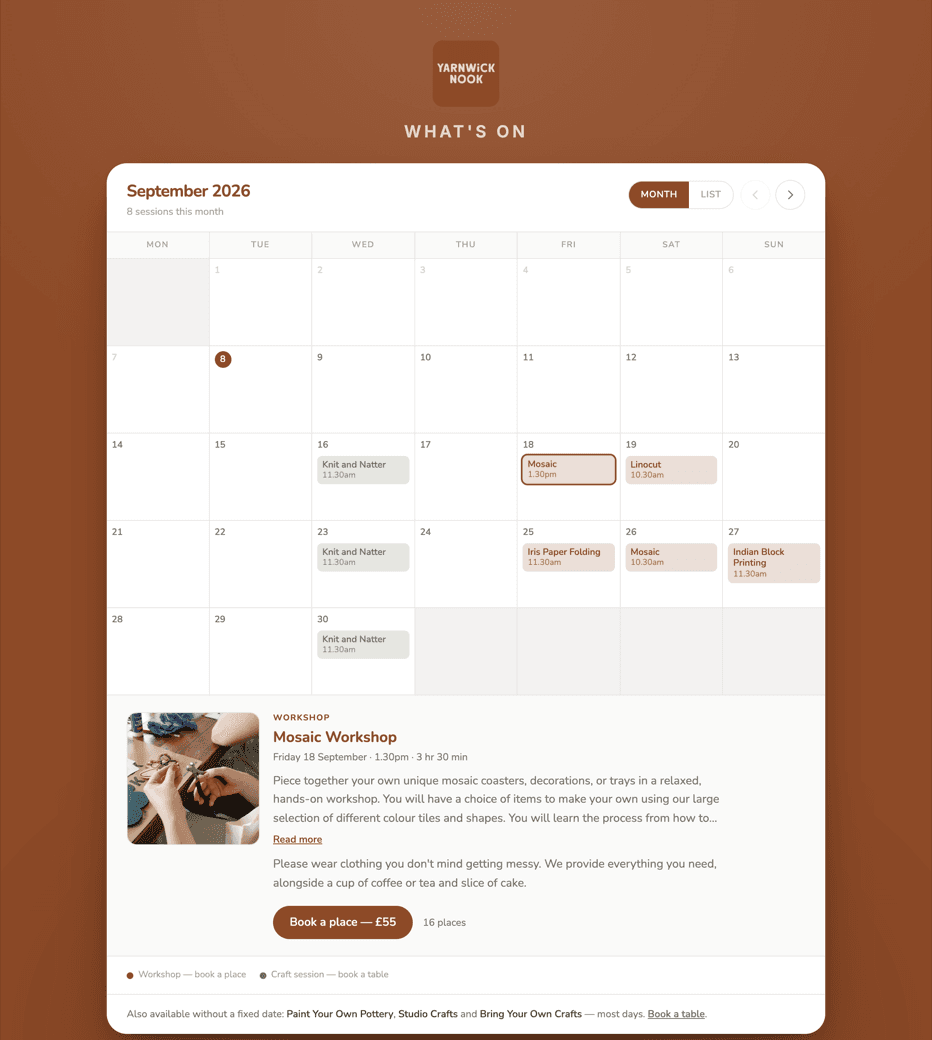
⚙️ Settings → Courses & Workshops, then Your what's-on calendar. Copy link is the quick way; Embed on your website puts it on a page.
✅ If you'd like a hand getting yours onto your website, just get in touch.
CRM & Loyalty is now GrowIt
A short one this week, and it's a name change rather than a new button. Nothing has moved, nothing has been switched off, and there's nothing you need to do.
Your loyalty cards, campaigns and AI advisor have been living under a heading called CRM & Loyalty since they launched in June. CRM is software jargon. It's the sort of word that means everything to the person who built it and not much to anyone running a studio on a Tuesday morning. The rest of the platform is named after the job it does, so this bit should be too.
Same page, new name
It's GrowIt now. You'll find it exactly where CRM & Loyalty used to be in your sidebar, and everything inside it is unchanged: digital loyalty cards, targeted campaigns, single-use reward QR codes, the AI Campaign Advisor and the Shared Success Network. Your existing cards, stamps and campaigns all carry on as they were.
The settings section has been renamed to match, so your mailing list, Mailchimp sync, customer tags and TextIt settings now sit under GrowIt rather than Customer Relationships. Same settings, same place in the list.
Why bother? Because this is quietly the part of the platform that brings people back through the door, and it was buried under a name that made it sound like admin. It's also doing the job a lot of studios were paying a separate email marketing subscription for, with the advantage that it already knows who came in, what they made and who hasn't been back since spring.
⚙️ It's GrowIt in your sidebar, and Settings → GrowIt — Marketing & Loyalty for the rest.
✅ Nothing to do this week. If you've not had a proper look at the loyalty cards or the AI advisor yet, GrowIt is a good place to spend ten minutes before the autumn gets busy.
Three Ways to Get Their Photos, and One Visit Makes One Record
A change worth knowing about if you take bookings, plus a handful of smaller things.
There are now three ways a customer can get their photos to you, they all work, and every one of them lands on the same record.
Three routes, one record
Check them out. Press Check out on the booking and they get an email with a link to upload their photos. Nothing new here, and we know customers don't always manage to find that email.
Show them their own QR code. Open their record and press QR Code. That code belongs to them alone — scanning it opens the submission form with their name, email and phone already filled in, so the only thing left to do is add the photos. Handy at the counter on the way out.
Let them scan your shop's QR code. This is the new one, and it's the same code for everybody, the one you put out on the tables. Until now it started a brand new record from scratch. Now, if they've been checked in, it finds the record their booking already made and fills that one in instead.
There's a small bonus in the third one: when they submit, their booking checks itself out, so you don't have to go back and do it.
⚙️ Press Show QR code in the navigation, then press and hold the code and choose Save to Photos. Print it out and stand it on the tables.
Why we changed it
Two things we kept seeing. Some studios had stopped checking bookings in at all, because checking in made a record and then the customer scanning the table code made a second one. And where shops were checking in, plenty of customers ended up with two records for a single visit anyway.
At one studio just over a third of every record was a duplicate.
So please do check your bookings in. It's what makes the day view useful, and it won't leave you with a mess to tidy up any more.
Also new
Photos add up now. If a customer sends photos and you add more yourself from the record, you keep both. Whichever was saved last used to quietly replace the other, in both directions. Same for the fired photos.
Tick boxes on your booking questions. Under Custom booking fields on a session type, you can give customers a set of options to tick instead of a blank box to type in. Whatever they choose shows on their record, and on the booking in your day view where you can change it.
Tables can vary by day. A table can be kept for certain session types on certain days of the week, rather than all week or not at all.
Scan QR keeps going. It no longer stops dead after one scan, so you can work through a stack of them.
✅ Everything above is already live and there's nothing to switch on.
Two New Ways to Set Up Your Sessions
Hope you've come through the summer holidays in one piece. Six weeks of full studios, back-to-back kiln loads, and a heatwave on top of it all. It's the busiest stretch of the year at the best of times, never mind trying to keep everyone cool while the kiln's going.
With the kids going back and things settling down a bit, it's a good moment for a tidy up of your diary. So here are two new things in BookIt, both about when your sessions run, and both built because a studio asked for them.
Add a one-off date to a weekly session
A studio got in touch about this one. Their taster session runs every Wednesday morning and they fancied trying it as an evening a couple of times a month. Up to now that meant building a whole second session type, with its own price and its own settings, sitting on your booking page looking like a different thing entirely.
Now you just open the session type you already have and pick Both. Keep your weekly days exactly as they are, and add whatever extra dates you fancy on top. Late night openings, a one-off Sunday, a Christmas special. They show up for customers right alongside your normal times, and everything else about the session stays the same.
Give each date a start and a finish time. If your sessions run as sittings you'll get one per sitting, and it tells you exactly what they'll be before you save. There's a recurring option too, so "second Wednesday of the month" is one job rather than twelve.
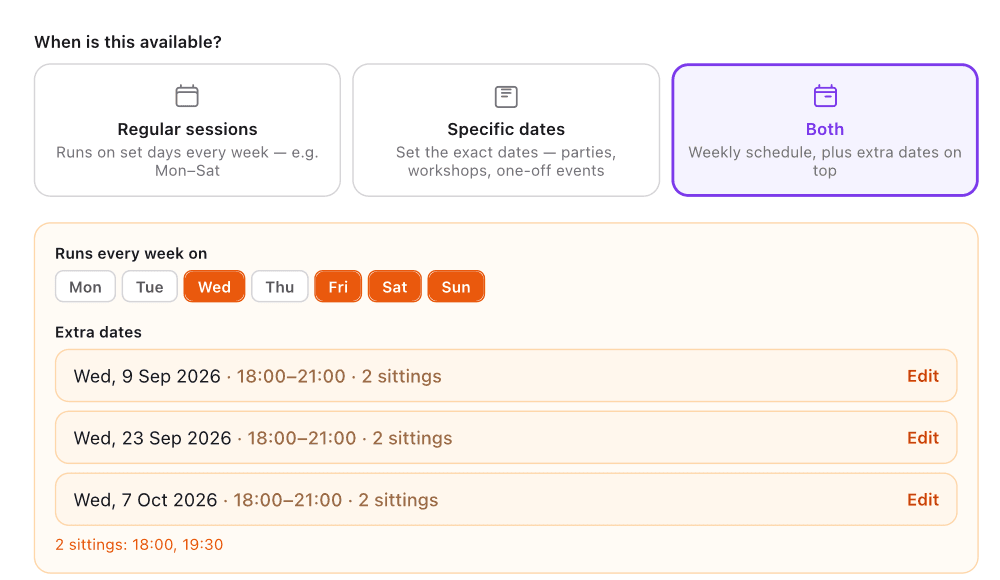
⚙️ Settings → BookIt → Session Types, then edit any session type and choose Both.
Different hours for part of the year
Another studio asked for this one. They open 10 till 4 normally, want to stay open till 6 through October, till 9 for November and December, then back to normal in January. Until now that meant four diary entries in your own calendar reminding you to go and change your hours, and one missed reminder running Christmas hours into February.
Set a date range and the hours you want for it, and that's that. Outside those dates your normal hours apply again on their own, so there's nothing to remember and nothing to undo.
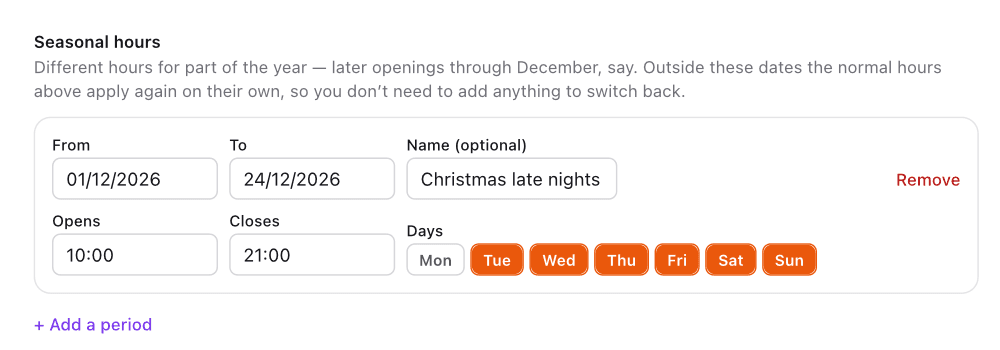
⚙️ Same place — Settings → BookIt → Session Types. Open a session type and scroll to Seasonal hours. Worth a look while Christmas is still far enough off to plan properly.
✅ If there's something you keep wishing the booking side did, do tell us. Both of these are here because somebody did exactly that.
ShopIt — Your Own Online Shop, Plus Postage for Painted & Fired Pieces
The summer holidays are here — six weeks of families looking for things to do and gifts to buy. Every studio we talk to has the same quiet frustration: the mugs, bowls and one-off pieces sitting on your shelves can only be bought by whoever happens to be standing in front of them. Today we're launching the alternative.
Say hello to ShopIt — your own online shop, already switched on in your CollectIt menu. And separately, a new option on the customer submission form: postage, for anyone who can't make it back in to collect.
A beautiful online shop that looks like you, not like software
Clean product tiles, big photos, your accent colour and logo, your banner across the top. Customers browse, pick a colour or size, add a personalisation message if you offer one, and check out — on their phone or at a desk.
Share the link on your socials, put it straight in your Instagram bio, or drop the whole shop into your own website with one line of embed code — exactly like the booking widget.
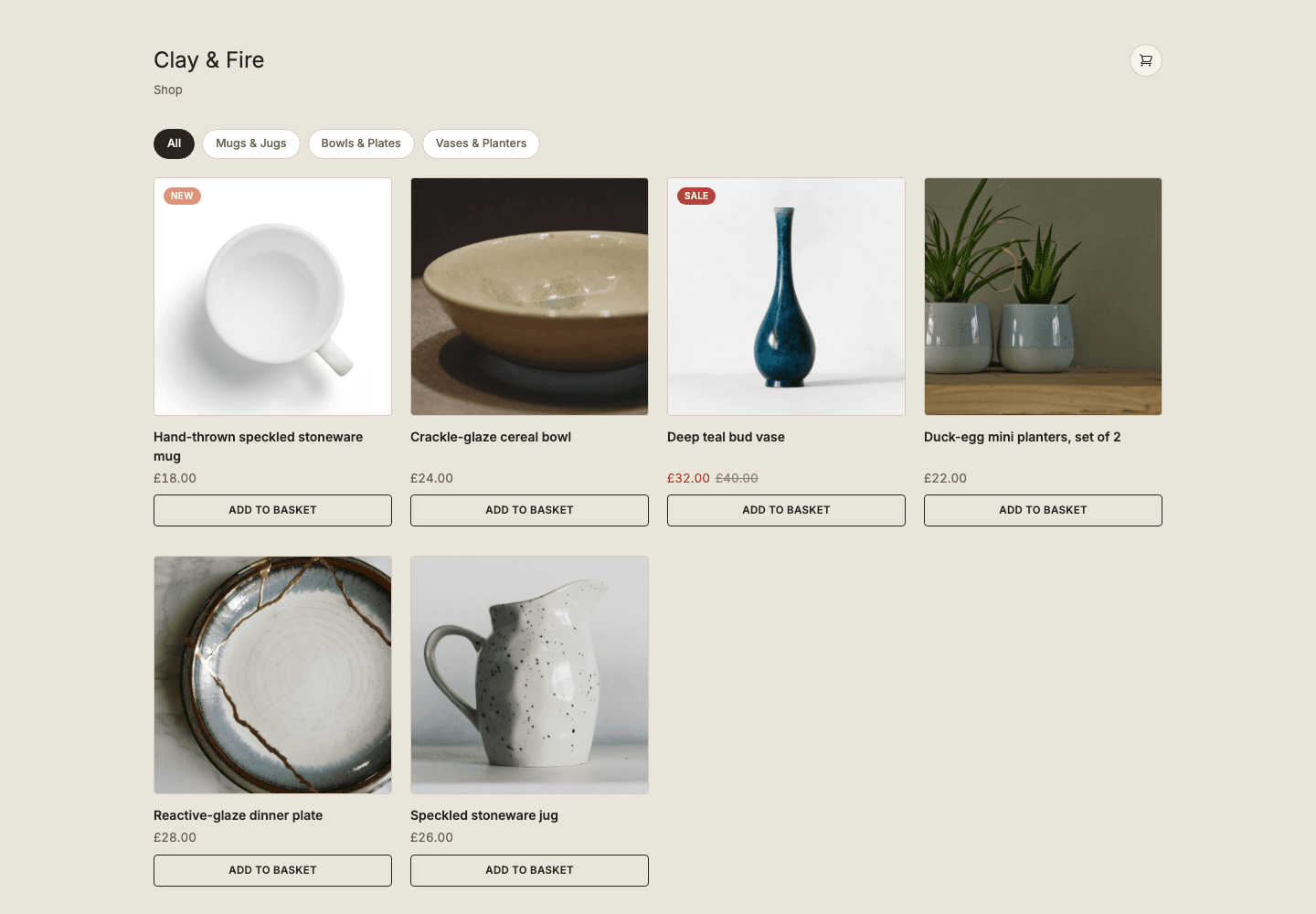
⚙️ Find it in your left-hand menu — ShopIt sits between Takeaway and ChargeIt. Add your first products, then flip the storefront live in ShopIt → Settings whenever you're ready.
The same checkout experience the big shops have
Multi-item basket, a free-delivery progress bar, and a payment step with Apple Pay, Google Pay, Klarna and card — plus your CollectIt gift vouchers, redeemable in full or part at checkout.
Fulfilment is your choice per shop: pickup in shop, flat-rate delivery with a free-over threshold you set, or both — the customer chooses at checkout. Every sale is paid straight into your Stripe account, just like your bookings.
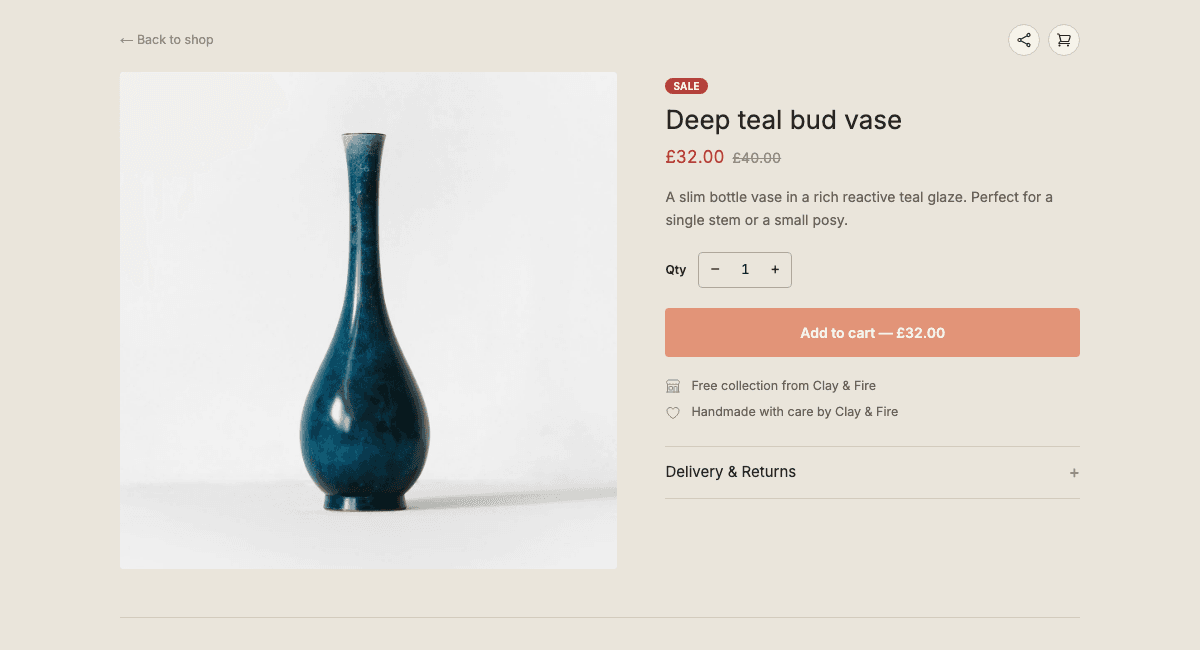
Every order managed from the same place as everything else
New orders land in ShopIt → Orders with status tabs, exactly like your collections dashboard. Mark an order ready and the customer gets a "ready to collect" email; mark it shipped with a tracking number and they get that instead, with the tracking link built automatically for the major carriers.
There's a full message thread per order — customers can reply to you directly — plus refunds without leaving the page. And because it's CollectIt, every ShopIt sale flows into your ChargeIt reports automatically, labelled as ShopIt.
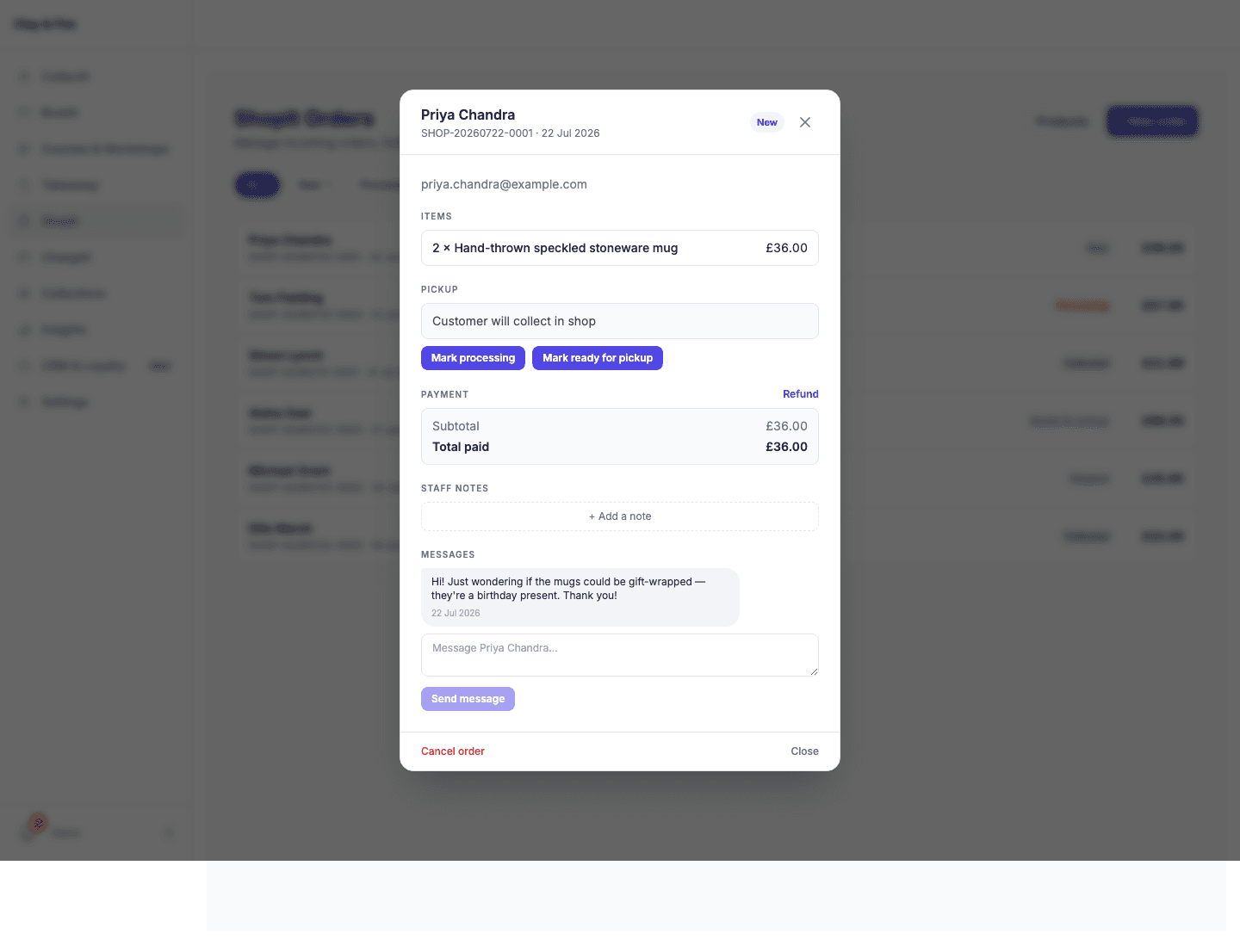
Postage — a new option on your customer submission form
Not every customer can come back in to collect. You can now offer postage as an alternative to collection, right on the submission form your painters and firers already fill in. Customers who can't make it back in tick "Request postage", fill in their address, and their record is automatically tagged so it's easy to spot in your dashboard.
When it's ready to go, mark it posted with the carrier and a tracking number — we build the tracking link automatically. The customer gets an "on its way" email with that link instead of a "come and collect it" one.
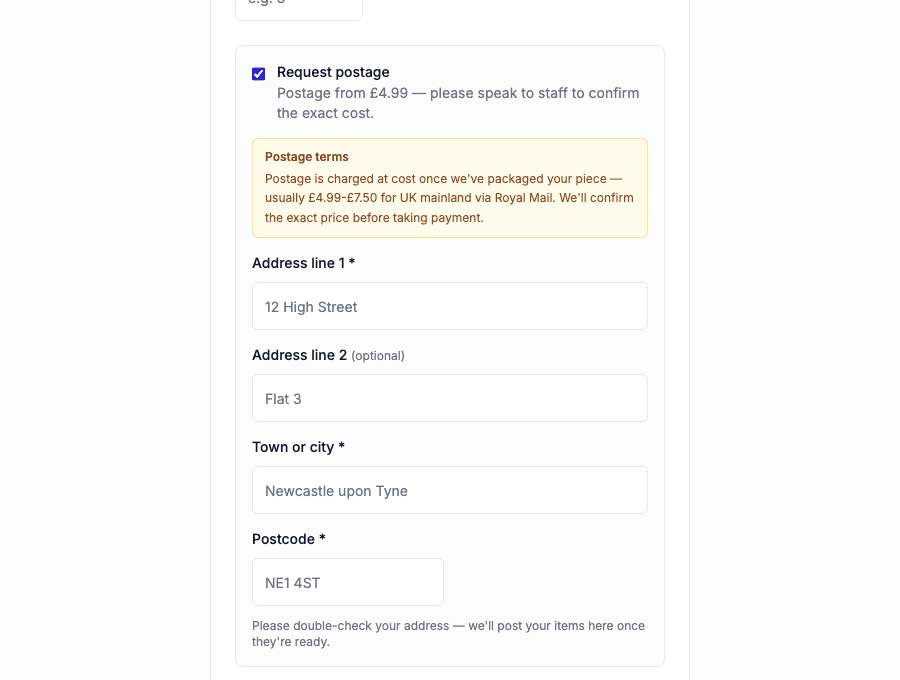
⚙️ Turn it on in Settings → Submission Form. Add your own postage terms so customers know what to expect before they tick the box.
✅ ShopIt is included with your CollectIt plan at no extra cost, while it's in early access. Postage is available to every shop today — both off by default, so nothing changes unless you switch them on.
CRM & Loyalty — Loyalty Cards, Campaigns & AI Advisor
Father's Day is around the corner and studios across the network have been busy with families making pieces for the occasion. While you've been doing what you do best, we've been finishing the biggest update CollectIt has ever shipped.
Today we're launching the full CRM & Loyalty system — loyalty stamp cards, targeted email campaigns, and an AI advisor that reads your own data and tells you who to target and what to offer. It's all included in your plan, and it's live right now.
Loyalty stamp cards — built around how your studio actually works
The loyalty scheme works for every studio — whether you use BookIt, ChargeIt, both, or neither. It's completely standalone. You don't need a booking system or a till to run it.
The moment a customer submits a CollectIt form, they're automatically enrolled and receive their first stamp. No staff action needed. Their digital loyalty card arrives in their welcome email and is theirs to keep.
For walk-in customers and anyone in a group who didn't fill in the form, print a QR code for your counter. They scan it, enter their name and email, and get their card instantly. Stamps can be added manually from the CRM & Loyalty page at any time — no till, no booking system required.
You choose your own rewards: set stamp thresholds and decide what customers earn at each tier. A free session, a discount, a complimentary glaze — entirely up to you. The accent colour on every card is pulled from your brand settings, so it looks like yours, not ours.
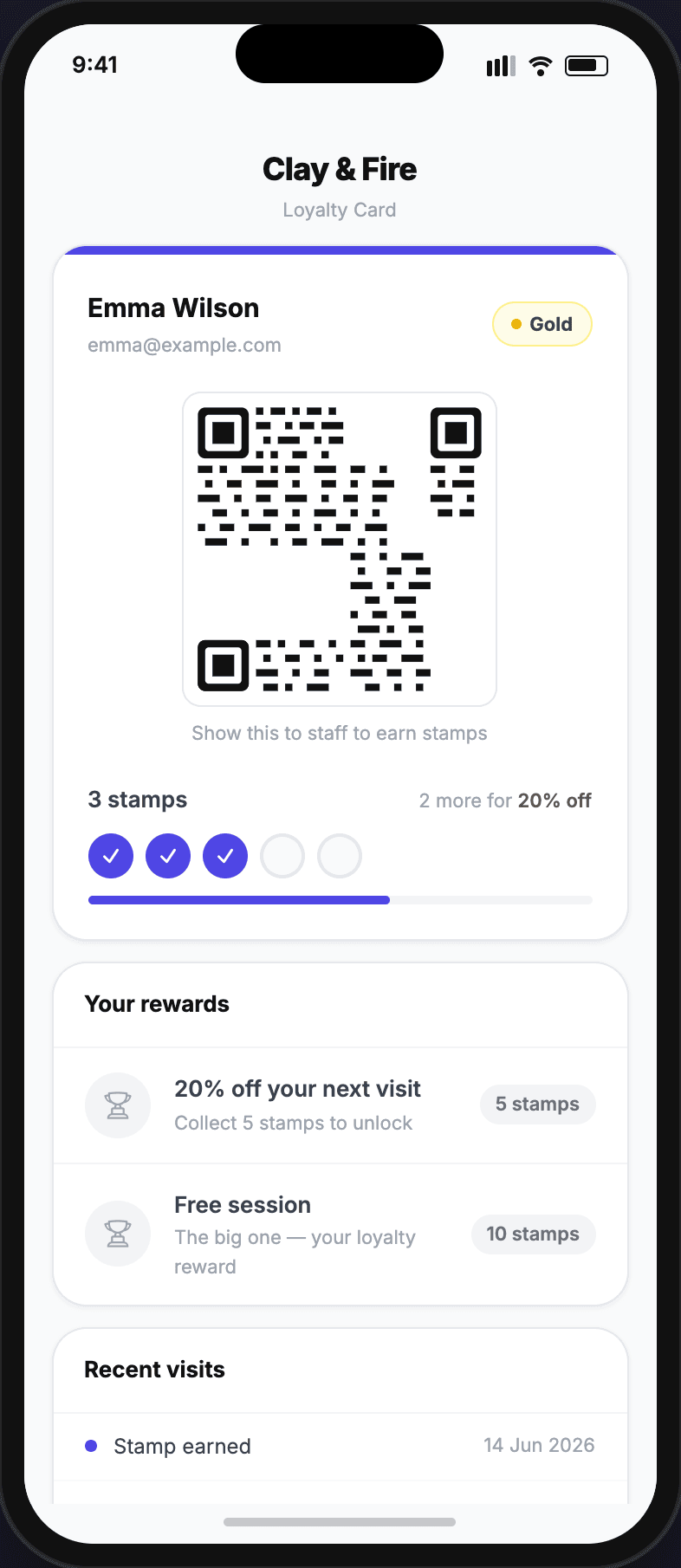
⚙️ Turn it on in Settings → CRM & Loyalty. Set your accent colour, stamp thresholds, and rewards. Then print a QR code for your counter — it takes about five minutes. No other CollectIt modules required.
Campaigns — targeted emails your customers actually want to receive
Build targeted email campaigns to the customers who are most likely to respond — lapsed visitors, loyal regulars, birthday month customers. Each campaign can include a reward: a discount code, a free session, or a gift. Choose between a ChargeIt promo code redeemed at your till, or a single-use QR code the customer presents in studio.
Campaigns are completely time and date specific. Set an expiry date, restrict redemption to certain days and times, and the system handles everything else — sending, tracking, and locking down each QR after it's been used once.
Everything is measurable in the dashboard: emails sent, opens, redemptions, and conversion rate per campaign. You'll see exactly what's working and what isn't.
No ChargeIt? No problem — campaign QR codes can be scanned using the Scan QR button in CollectIt instead, no till required. And if you want to grow your marketing list beyond existing customers, the website widget lets anyone sign up directly from your own site.
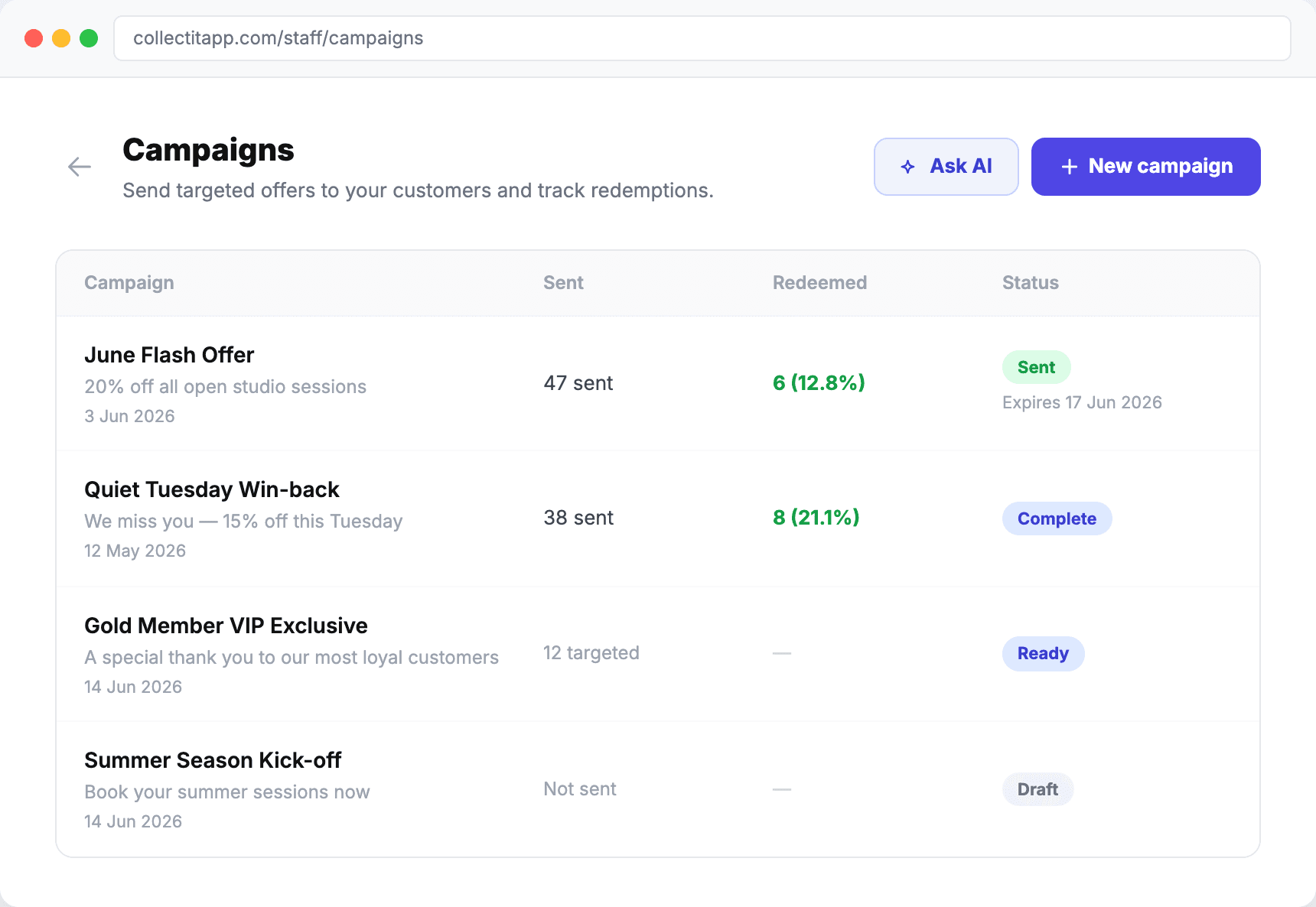
⚙️ Find it under CRM & Loyalty → Campaigns. Run the AI Advisor first for segment recommendations, then build your campaign around what it suggests.
AI Campaign Advisor — your data, turned into a strategy
Not sure who to send your next campaign to, or what to offer? The AI Advisor looks at your actual bookings, sales, and customer history, then tells you where your opportunities are — which customers are overdue a visit, which segments are most likely to respond, and what kind of offer is likely to land.
It's not generic marketing advice. It's built on your data, for your studio. Think of it as having a marketing strategist on hand whenever you're setting up a campaign.
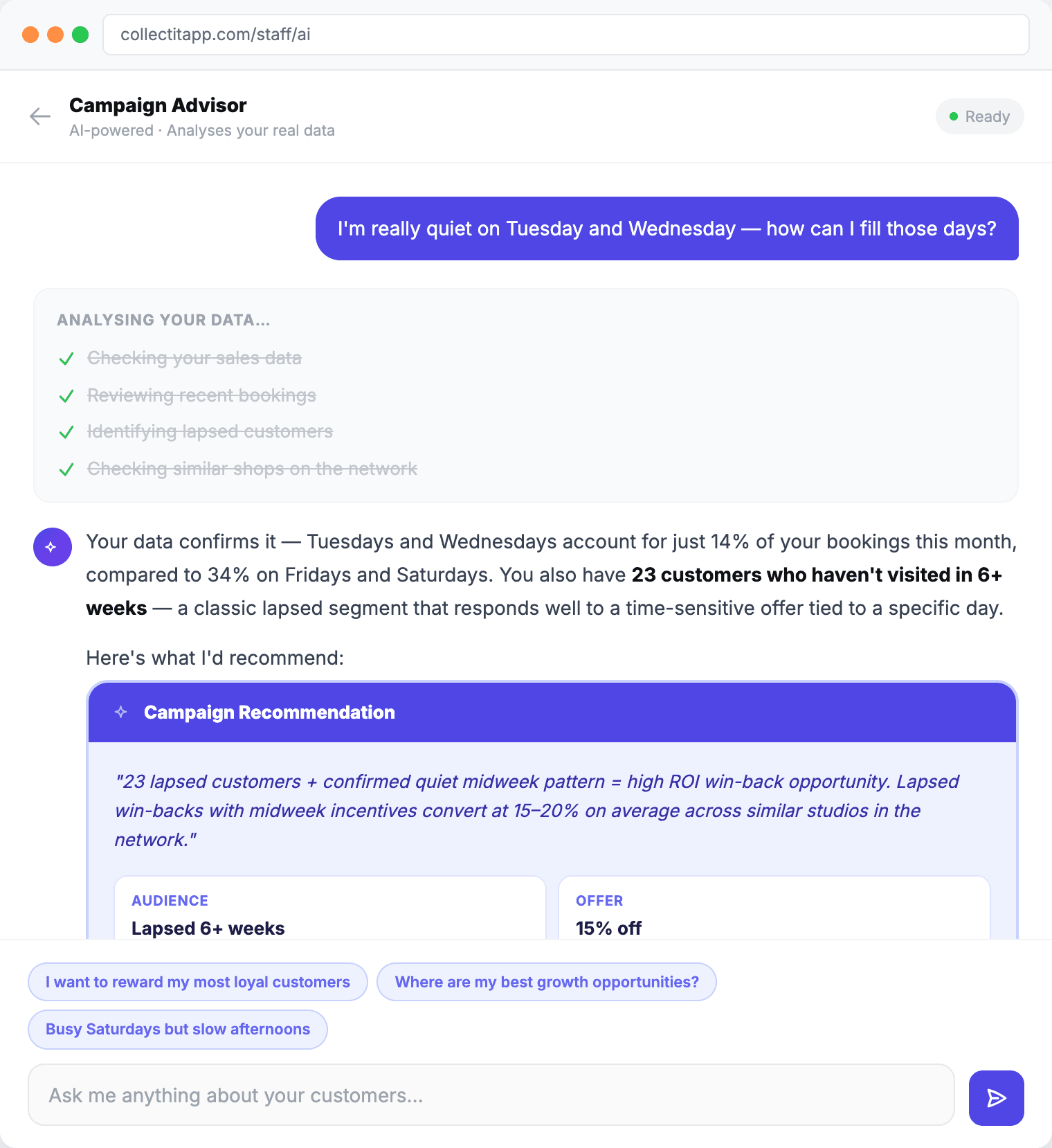
⚙️ Find it under CRM & Loyalty → AI Advisor. Run it before you build a campaign — it'll give you segment-by-segment recommendations based on what's actually been happening in your studio.
✅ The full CRM & Loyalty system is included in your CollectIt plan. Loyalty cards, campaigns, and the AI advisor are all live today — head to CRM & Loyalty in your dashboard to get started.
Shared Tables, Booking Page Backgrounds, Mailing List Widget & Gift Voucher Scheduling
To our UK shops — we hope half term has the kids piling through the doors despite the sunshine trying its best to lure everyone to the garden. And to our US shops — hope Memorial Day weekend brought a busy, bustling studio full of families and friends making the most of the long weekend together.
While you've been keeping everything spinning, we've shipped four new features and a couple of smaller wins. All included in your plan, as always.
Share Table — squeeze more bookings into your busiest sessions
If you run popular events — Friday night adults' sessions, weekend family slots, holiday workshops — you'll know the maths: sometimes you have more people wanting to book than tables to put them on. Two parties of two, one table of four that neither party quite fills. Until now, the system would block one booking from using the table once the other was on it.
The new Share Table option lets you do exactly that. Just open a booking, go to Modify → Table Picker, and select the table you want — even if it already has someone on it. The system lets you force the booking through, so you're in control. On the Gantt chart, you'll see all bookings assigned to that table, and if the combined covers go past the table's normal capacity, the count turns red — a helpful nudge that you're pushing beyond the comfort zone.
This one came directly from a shop who told us they were manually working around the single-booking-per-table limit during their busiest sessions. We built it the same week. If you've got something in your workflow that feels harder than it should be, tell us — the best features in CollectIt started as a sentence in someone's reply.
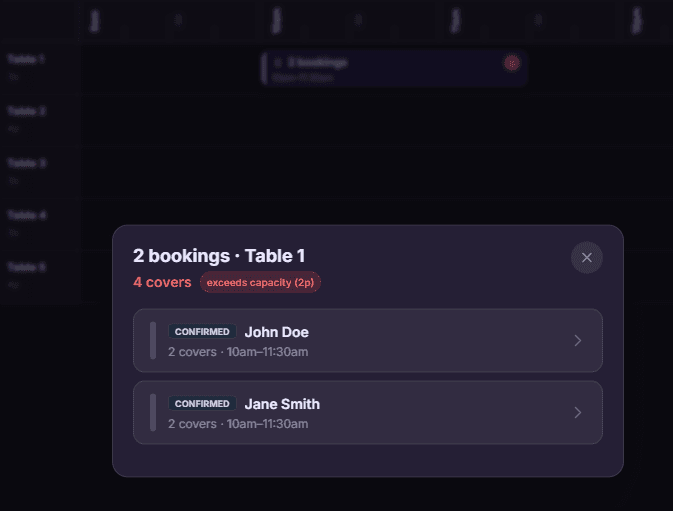
⚙️ How it works: Open any booking on the Gantt → Modify → Table Picker → select a table that already has bookings assigned to it. The system will let you place the booking there.
Custom background image for your booking page
Your booking page is often the first thing a customer sees when they decide to visit. Until now it's been clean and functional — but it looked like our page, not your studio.
You can now upload a background image that sits behind your booking form — a photo of your studio, your kiln room, a shelf of finished pieces, or whatever captures the feel of your space. The image is fixed in place behind the form — it doesn't scroll — so it works as a proper backdrop without distracting from the booking flow. And it looks great on mobile too.
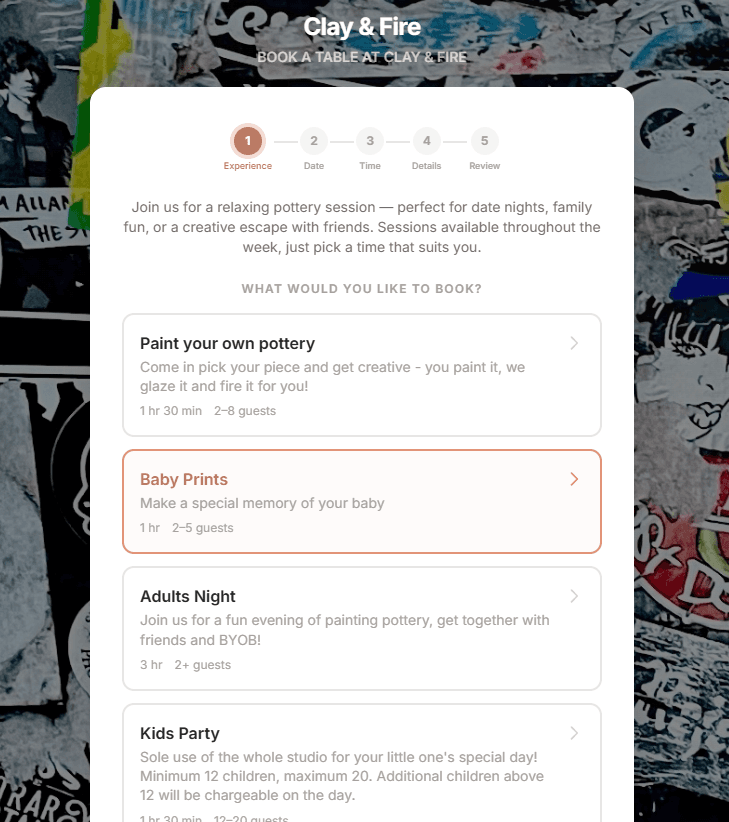
⚙️ Set it up in Settings → BookIt → General. Upload your photo under "Booking page background image" and it appears immediately.
Mailing list widget — grow your list from your own website
Social media is great until the algorithm changes. Email is yours forever. The new mailing list widget lets you collect sign-ups directly from your own website, building a list of customers who actually want to hear from you — no algorithm, no platform risk, no middleman.
You get two options: a direct sign-up link to share anywhere, and an embeddable widget — one line of HTML pasted on your website, and the sign-up form appears automatically, styled to match your brand colours. Customers can optionally add their birthday.
This is more than just a mailing list. It's the foundation of the loyalty and CRM features we're building next — birthday offers, visit tracking, and proper customer relationships that help you reward your regulars.
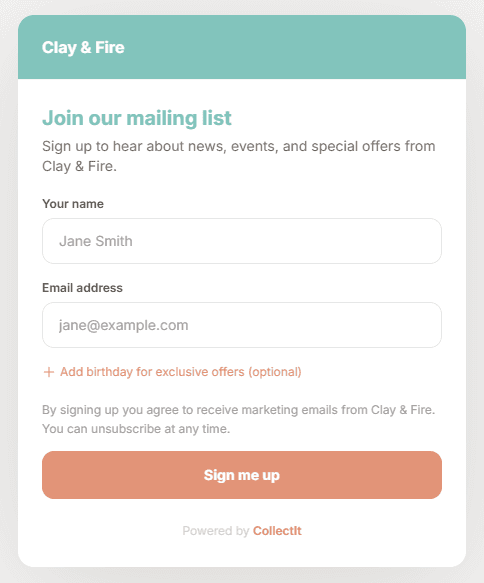
⚙️ Find it in Settings → Customer Relationship → Mailing List Widget. Copy the link or the embed snippet and paste it into your website.
Scheduled gift voucher delivery — send it at the right moment
Gift vouchers have been available in ChargeIt for a while, and they've been quietly popular. But there was always one friction point: if you bought a voucher on Tuesday for a birthday on Saturday, it arrived immediately.
You — and your customers buying online — can now pick a date and time for the digital voucher to land in the recipient's inbox. Buy it today, schedule it for the birthday morning, and forget about it. The purchaser gets a confirmation email straight away so they know it's taken care of.
If you're not selling gift vouchers yet — here's why you should. Industry-wide, between 10% and 20% of gift vouchers are never redeemed. That's revenue in your account today for a service you may never have to provide. And even the ones that are redeemed bring customers through the door who typically spend more than the voucher value.
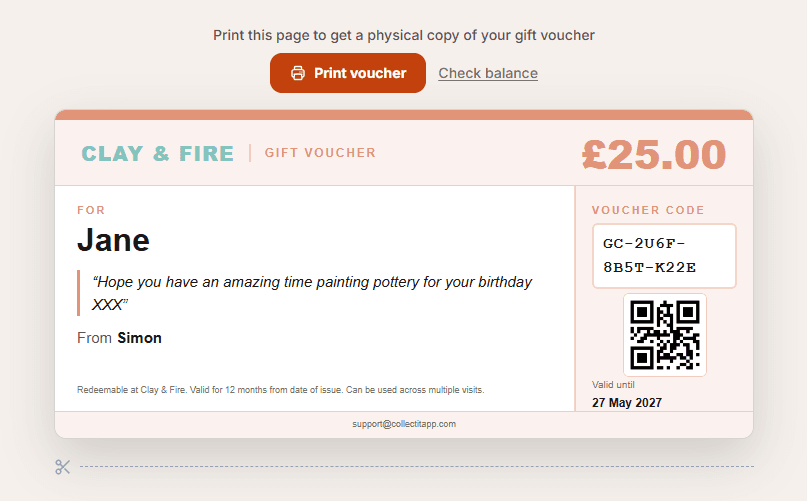
⚙️ To issue a scheduled voucher at the till: ChargeIt → Gift Voucher → choose "Digital — scheduled delivery." Online customers see the date picker during checkout automatically.
✅ Everything above is included in your existing plan. Booking page backgrounds, shared tables, and the mailing list widget are available on all plans. Gift vouchers require ChargeIt (Studio plan or above).
Glazing Queue, Accountant Summary & AI Customer Profiles
The last week of May brought half term, a bank holiday, and a heatwave — and we shipped three proper features plus a stack of smaller wins. All included in your plan, as always.
Glazing queue — track every piece from throwing to firing
For studios that make pottery as well as painting it, you can now add a glazing field to your intake form — and choose which session types it appears on. When a customer submits their piece, they pick their chosen glaze. That selection shows up as a coloured badge on their customer card and on every photo in the gallery.
In the gallery, there's now a dedicated Glazing tab — a live queue of every piece that still needs to be glazed. Tap to select the ones you've done, hit Mark as glazed, and they move straight into the regular gallery flow ready to be fired.
⚙️ Set it up in Settings → Submission Form. You choose which session types show the glazing field.
Accountant Summary — one click, print-ready PDF
End of quarter, your accountant sends an email. You spend 45 minutes pulling numbers together. Not any more. The new Accountant Summary generates a clean, print-ready page covering gross revenue, VAT, net sales, payment method breakdown, liabilities, discounts, and refunds. Pick your date range and print or save as PDF.
⚙️ Find it under ChargeIt → Reports → Accountant Summary.
AI customer profiles — know your regulars better than ever
Open any returning customer's booking and tap Customer Insight. CollectIt generates an AI-written summary of everything it knows: visit history, spend patterns, pieces per visit, photo style, no-show history, and staff notes. Perfect for giving regulars a warm, personal welcome — or spotting patterns worth knowing about.
⚙️ Available from a customer's second visit onwards. Find the button in the CRM panel when you open a booking.
Courses & Workshops, AI Inventory Import & Gift Vouchers
A packed update covering four significant additions — all included in your existing subscription. No upgrades, no extras, no surprises.
Multi-session courses and one-day workshops — fully managed
Create multi-session courses with a fixed schedule, set a per-person price, and let customers enrol online. The system handles capacity, waitlists when full, payment collection, and automated reminders before each session. You can enrol multiple attendees in one go from the staff dashboard.
AI invoice import — photograph a delivery note, watch it build your inventory
Photograph a supplier invoice or delivery note and ChargeIt reads it using AI — imports every item, suggests a selling price, creates till buttons, and starts tracking stock straight away. No more manual data entry from delivery notes.
Gift vouchers — sell online and in-store, track every penny
Customers can buy gift vouchers online from your booking page, or you can sell them in-studio through ChargeIt. Vouchers are redeemed at the till with balance tracked automatically. Unused balances stay on the voucher for future visits.
Waitlist, TextIt SMS, Takeaway Boxes & US Localisation
A bigger update as we head into summer — four new features plus groundwork for what's coming next.
Waitlist — turn 'fully booked' into 'we'll call you'
When a session is fully booked, customers can add themselves to the waiting list instead of leaving disappointed. When a place opens up, the system can auto-notify everyone on the list — first to claim gets the spot — or you can manually trigger offers after reviewing the list.
⚙️ To enable: edit any session type in BookIt Settings → expand More options → tick Enable waitlist.
TextIt — SMS that actually gets read
TextIt adds SMS to your toolkit. Day-before booking reminders dramatically cut no-shows. Overdue collection nudges get pieces off your shelf faster. Waitlist alerts mean no one misses out because they weren't checking email. £2/month line rental, just 5p per message — you only pay for what you send.
Takeaway Boxes — paint at home, managed properly
Online booking with deposits via Stripe. Track what's out, what's returned, what's overdue. Payments handled seamlessly. Flows straight into CollectIt once items come back — no double-entry.
CollectIt in the US — fully localised
Everything now adapts automatically for US studios: USD currency, local sales tax, 12-hour clock, local time zones, Stripe Connect for US payment processing. Just set your country in Shop Settings.
BookIt & ChargeIt Launch — the full platform is here
This one was different from our usual updates. We'd been quietly building something much bigger — a complete end-to-end system for pottery studios, from booking through to payment and collection. BookIt and ChargeIt graduated from beta and became available to every shop.
BookIt — online bookings built for pottery studios
Not adapted from a restaurant platform. Session types with custom durations, capacities, and deposit rules. A live Gantt schedule showing every table and booking. Automated confirmation and reminder emails. Customers book online 24/7 without a phone call.
ChargeIt — your till, no hardware, no fees
A full EPOS system in your browser. Photo-button product catalogue. Stripe payment links sent to customers' phones — no card machine needed. Inventory tracking with live stock levels. Sales reports, cash-up summaries, and deal management. ChargeIt and BookIt work together: deposit paid at booking is automatically deducted at checkout.
Partial Firing — track batches, send one email
A focused update shipping one of the most-requested features from studios doing high-volume kiln work.
Partial firing — no customer waits on one straggler item
Previously, when a customer dropped off multiple pieces, the whole order was held back until every piece was fired. Now you can mark individual items as fired and ready, and the system sends a single email listing exactly which pieces are ready for collection — with the remaining items clearly noted as still in progress.
This means faster collections, happier customers, and less shelf clutter from orders waiting on that one piece that needs an extra glaze firing.
Collection Bookings, Customer Tags & Mailchimp Sync
A packed update with what we called one of the most impactful features we'd shipped to date.
Collection bookings — let customers book their pickup slot
Instead of an open-ended 'come and collect whenever,' customers receive a link to book a specific collection time slot. This spreads collections across the day instead of everyone arriving at once, and dramatically reduces uncollected items sitting on your shelf for weeks.
Customer tags — organise your customer list your way
Add custom tags to any customer — 'VIP', 'school group', 'birthday party', 'wholesale' — and filter your customer list by tag. Build saved segments for targeted marketing or quick reference.
Mailchimp sync — your customer list, automatically in Mailchimp
Connect your Mailchimp account and customer emails flow automatically into your mailing list. Marketing opt-ins collected at drop-off go straight to Mailchimp — no exporting, no CSV wrangling, no double-handling.
Storage Locations, Social Sharing & More
Our first shop update email — a thank you to early customers and the first batch of improvements based on their feedback.
Storage locations — know exactly where every piece is
Assign pieces to named storage locations (Shelf A, Kiln Room, Glaze Bay) as they move through your studio. Filter the dashboard by location to see exactly what's where — no more hunting for that one mug someone put in the wrong place.
Social sharing — let customers show off their creations
When customers receive their fired photo email, they can share it directly to Instagram, Facebook, or WhatsApp. Every share carries your studio's name and a link back to your booking page — free marketing from happy customers.